2013年12月6日星期五

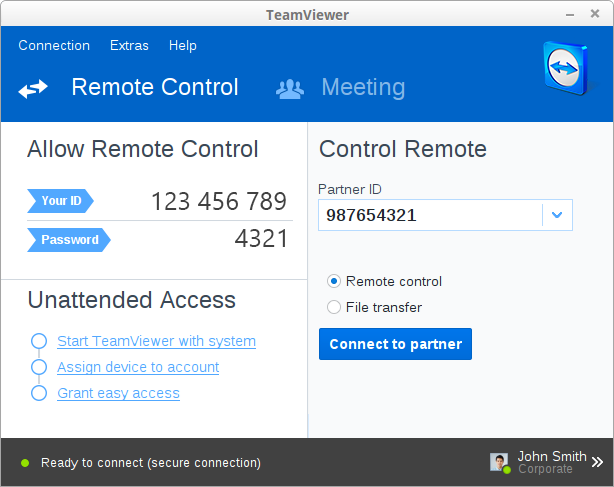
远程控制工具 TeamViewer 9 使用


TeamViewer 是个非常好用的远程控制工具,具体内容请看官网

 TeamViewer 9 最新版本下载地址:https://www.teamviewer.com/zhcn/download/windows.aspx

windows版的就不说了,下面主要说一下linux版本的:

官网提供了  Ubuntu, Debian ,RedHat, CentOS, Fedora, SUSE  的安装包。

其他系统可以下载tar.gz 的那个包,这个不用安装,解压缩后就能用。

下面说一下这个tar.gz的 怎么用,因为我就是用的这个。

下载完tar.gz后 解压缩,打开终端,输入  :


tv-setup --checklibs   这个是查看系统有没有安装所需要的lib,缺失的lib会给出提示,请自行安装。

如果所有的lib都安装了,你只需双击“teamviewer” 那个文件 就可以运行了。


附:安装说明 

2013年11月27日星期三

virtualbox 安装xp cpu占用100%

在 virtualbox 中安装了xp  cpu一直占用100%,google了一会 发现是自动更新服务打开了。
解决方法:关闭自动更新     cpu立马下去了

2013年11月6日星期三

gOagent y2b 无法看视频解决方法


switchysharp中添加下面俩规则:
*://*.googlevideo.com/* 
*://*.youtube-nocookie.com/*


没第一条规则视频显示不出来,没第二条规则评论和相关视频图片显示不出来。


来源

2013年9月6日星期五

linux下给图片批量瘦身

for img in *.jpg;do convert -quality 60 "$img" "$img"_resized.jpg; rm "$img" ; mv "$img"_resized.jpg "$img"; done

2013年8月28日星期三

Manjaro 设置时间 时区


Setting Your System's Time

Occasionally some users have the need to reset their Manjaro system's time/date. This is quite an easy process involving a few steps at the command line (for those unfamiliar with the command line see the section above this one).

Check your system's time/date settings

The following command:
[handy@jarmano ~]$ timedatectl status
Gives this output on my machine:
[handy@jarmano ~]$ timedatectl status
      Local time: Mon 2013-07-08 10:21:32 WST
  Universal time: Mon 2013-07-08 00:21:32 UTC
        RTC time: Mon 2013-07-08 00:21:32
        Timezone: Australia/Perth (WST, +800)
     NTP enabled: no
NTP synchronized: no
 RTC in local TZ: no
      DST active: no
 Last DST change: DST ended at
                  Sun 2013-04-07 02:59:59 WST
                  Sun 2013-04-07 02:00:00 WST
 Next DST change: DST begins (the clock jumps one hour forward) at
                  Sun 2013-10-06 01:59:59 WST
                  Sun 2013-10-06 03:00:00 WST
The above output has the wrong Timezone, & NTP not enabled. If the output on your machine does NOT have the correct Timezone: &/or has NTP enabled: no then continue & we'll fix those problems up.

Turn on the Network Time Protocol (NTP) [1]

First off we had better be sure that even though the ntp package is installed by default on the Manjaro system, it is actually there, if it is already there this will do no harm:
[handy@jarmano ~]$ sudo pacman -S ntp
Now we can turn on ntp on by using the following command in the Terminal (sudo requires the root password):
[handy@jarmano ~]$ sudo timedatectl set-ntp true

List Supported Timezones (locales)

The following command lists the supported timezones:
[handy@jarmano ~]$ timedatectl list-timezones
Scroll through this list (use the space bar to move to the next page) to find yours, then use your mouse to highlight it & then copy it using the Terminal's menu or the keyboard shortcuts (Ctrl, Shift & C). Typing q at any time will return you to the Terminal prompt.

Set the Correct Timezone

Now that you have your timezone copied to the clipboard, we need to tell the system to use it. We do that with the following command (requires root password), this example uses my timezone of Australia/Sydney:
[handy@jarmano ~]$ sudo timedatectl set-timezone Australia/Sydney

Verify that your Timezone (time & date) & NTP are working

To verify that your input has worked enter the following command:
[handy@jarmano ~]$ timedatectl status
      Local time: Mon 2013-07-08 10:21:32 EST
  Universal time: Mon 2013-07-08 00:21:32 UTC
        RTC time: Mon 2013-07-08 00:21:32
        Timezone: Australia/Sydney (EST, +1000)
     NTP enabled: yes
NTP synchronized: yes
 RTC in local TZ: no
      DST active: no
 Last DST change: DST ended at
                  Sun 2013-04-07 02:59:59 EST
                  Sun 2013-04-07 02:00:00 EST
 Next DST change: DST begins (the clock jumps one hour forward) at
                  Sun 2013-10-06 01:59:59 EST
                  Sun 2013-10-06 03:00:00 EST
You should now see the Timezone:  with your previously entered Country/City, NTP enabled: yes should be showing & most importantly your time & date should be correct.

Set the System Time

For those that have a need to set the system's clock directly, use the following command:
[handy@jarmano ~]$ sudo timedatectl set-time "2013-08-11 23:56:16"

If you still have problems please post in this Manjaro forum thread: [2]
2013年8月9日星期五

feedly 页面无法显示

最近feedly 页面打开什么都不显示,就是一个大白页面 。找了下原因 原来是 s3.feedly.com 被屏蔽了。
果断添加 *://*.feedly.com/* 就好了

详情:
https://code.google.com/p/autoproxy-gfwlist/issues/detail?id=35

2013年7月2日星期二

opensuse PK_TMP_DIR问题

在 openSUSE 安装程序时,有时会出现类似这样的错误。原因大概是在第一次安装时被中断了,而安装过程中的临时文件没有被清理掉。

[PK_TMP_DIR|dir:///var/tmp/TmpDir.EDyYC2] Repository already exists. 

解决办法是运行以下几条命令,

sudo zypper rr 2
sudp zypper rr 1
sudo zypper clean –a

2013年5月24日星期五

经典连环画[第一期]100部,看看有没有你童年里的记忆。

经典连环画[第一期]100部,看看有没有你童年里的记忆。


2013年4月26日星期五

在openSUSE12.3上安装Virtualbox

参考:http://linuxg.net/how-to-install-virtualbox-on-opensuse-12-3/
      http://zh.opensuse.org/SDB:Virtualbox


---------------------------------------------------------------

1 Virtualbox 需要 libpng12.so.0 所以 先安装 libpng12.so.0
$ sudo zypper in libpng12.so.0

2 从VirtualBox  网站下载下载软件包  现在最新版本4.2.12
https://www.virtualbox.org/wiki/Linux_Downloads

*for 32 bit systems:
$ wget http://download.virtualbox.org/virtualbox/4.2.12/VirtualBox-4.2-4.2.12_84980_openSUSE114-1.i586.rpm


*for 64 bit systems:
$ wget http://download.virtualbox.org/virtualbox/4.2.12/VirtualBox-4.2-4.2.12_84980_openSUSE114-1.x86_64.rpm


Install the Virtualbox *.rpm file:
sudo rpm -ivh xxx.rpm

3 升级内核后重装 Virtualbox 内核模块

sudo /etc/init.d/vboxdrv setup


如果报错 试试下面:

zypper install -y make gcc gcc-c++ kernel kernel-devel

reboot一下

kde4 自动启动fcitx输入法

在~/.kde4/Autostart/目录新建一个fcitx.desktop文件,然后输入一下内容保存,注销下就行了,不需要改其他地方
[Desktop Entry]
Name=Fcitx
Name[zh_CN]=Fcitx
Name[zh_TW]=Fcitx
Comment=Chinese Input Method
Comment[zh_CN]=中文输入法
Comment[zh_TW]=中文輸入法
Exec=fcitx
Icon=fcitx
Terminal=false
Type=Application
Categories=System;Utility;
StartupNotify=false
X-GNOME-Autostart-Phase=Applications
X-GNOME-AutoRestart=false
X-GNOME-Autostart-Notify=false
X-KDE-autostart-after=panel
X-KDE-StartupNotify=false
 
保存,完成

换到了openSUSE12.3


换到了Tumbleweed源  始终保持最新,也能滚了。
用着挺稳定

2013年3月21日星期四

archlinux chrome goagent 无法看yutube


sudo pacman -S python2-gevent-beta  python2-pyopenssl

python2-pyopenssl没装的话,就算导入了证书,浏览器还是会提示错误。


http://tieba.baidu.com/p/1749710451

2013年3月18日星期一

perl 抓取flvcd生成的链接 保存为播放列表

perl 抓取flvcd生成的链接 保存为播放列表

例如 抓取这个
http://www.flvcd.com/parse.php?kw=http%3A%2F%2Fso.letv.com%2Ftv%2F86764.html&format=high


抓取所有的视频地址 可以保存下链接 在mplayer里播放:


use LWP::Simple;
use HTML::LinkExtor;

#$html = get("http://www.flvcd.com/parse.php?kw=http%3A%2F%2Fso.letv.com%2Ftv%2F86764.html&format=high");


if ( @ARGV == 1 ) {
  #$html = $ARGV[0];
  $html = get($ARGV[0]);
  $link_extor = HTML::LinkExtor->new(\&handle_links);
  $link_extor->parse($html);
}else{
   print "请输入url \n 例如:genLIst.pl \"url\"  url请用引号\n";
}

sub handle_links
{
    ($tag, %links) = @_;

    if ($tag eq 'a') {

        foreach $key (keys %links) {
           
            if ($key eq 'href') {
               if($links{$key} =~ /host=www_letv_com/){  #这里做了一下判断
print "$links{$key}.\n";
      }
             

            }

        }
    }
}

----------------